Switch coding agents.
Keep the conversation.
Resume anywhere.
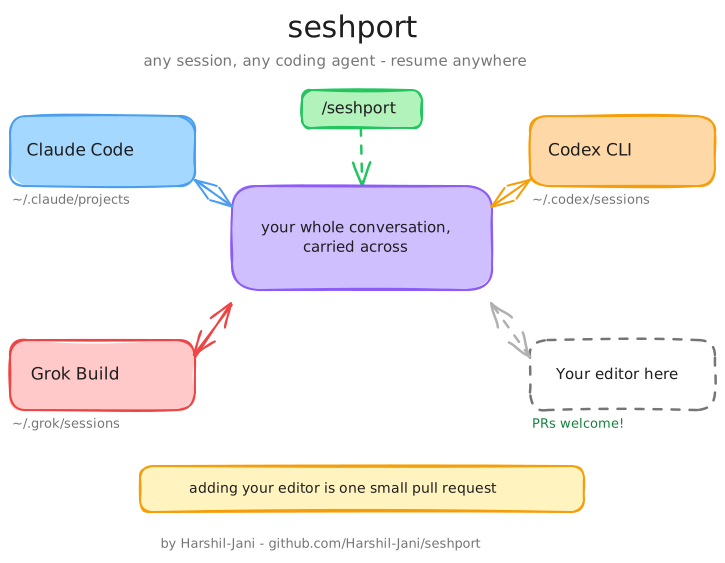
seshport ports your session between Claude Code, Codex, and Grok Build. Type /seshport mid-conversation, open the other agent, and it remembers everything: decisions, tool output, all of it.
Install in one line →npm i -g seshport · pip install seshport · cargo install seshport · brew install harshil-jani/tap/seshport
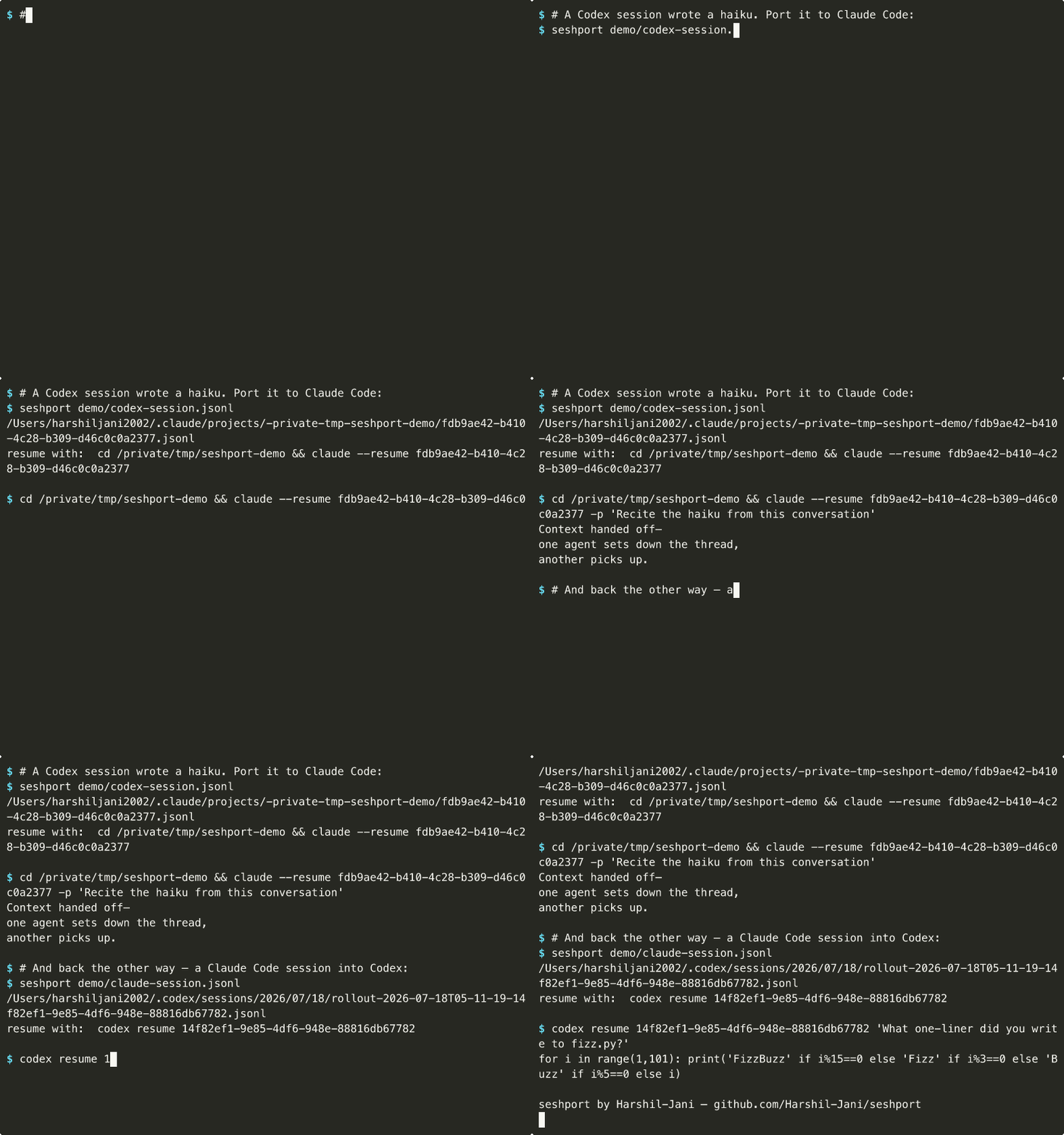
⇄ This is seshport, a real port in both directions
Built, verified and shipped in the open
Why teams use it
Momentum shouldn't belong to one tool
Teams mix AI coding assistants for strengths, pricing, and availability. seshport makes the conversation portable, so switching tools never costs you the work.
No vendor lock-in
Evaluate any new assistant without abandoning weeks of accumulated context. Your history belongs to you, not to a tool.
Beat usage limits
One assistant hits its cap mid-task? Continue the same task in another, instantly. No re-briefing, no lost thread.
Right tool per task
Plan with the assistant that reasons best, build with the one that codes fastest. The conversation follows you.
How it works
From amnesia to continuity
Type /seshport, anywhere
Mid-conversation, in whichever agent you're using. seshport finds the live session on disk (every agent keeps its transcript in its own format) and detects the direction automatically.
The transcript gets translated
Messages flow through one neutral transcript. Tool calls flatten to readable text,
provider-internal state is dropped, and the result lands where the other agent's
resume already looks.
Paste one line. Keep going.
You get back codex resume <id> or claude --resume <id>.
The next agent picks up exactly where the last one stopped, verified with real round-trips:
a codeword planted in one agent was recalled by the other.
Install
Plug in from any registry
One binary, five channels. The curl one-liner also installs the /seshport slash command for Claude Code and Codex.
npm i -g seshport
PyPI pip install seshport
crates.io cargo install seshport
Homebrew brew install harshil-jani/tap/seshport
Binaries mac · linux · windows
The big picture
The whole idea, on one whiteboard
Morning in one assistant, afternoon in another, same conversation. Engineers can read the deeper design in the repo; this is the version worth forwarding.
The obvious question
Can't I just paste the context across?
You can, the same way you can deploy by copying files by hand. Here is what the paste workflow actually costs.
Summaries are lossy
Pasting means summarizing first, and a summary keeps what seemed important at the time. Three hours later you need exactly the detail it dropped. seshport moves the raw transcript. Our test: a codeword planted in one agent was recalled verbatim by the other.
Pasted text is not history
A pasted wall of text becomes one giant user message. A ported session lands in the target tool's native resume flow: turns render properly, session pickers and forks keep working, and the conversation stays structurally correct.
The friction never ends
Summarize, wait, copy, open the other tool, paste, re-explain. Five minutes, every switch, forever. One slash command is five seconds. Anything you do ten times a day deserves a command.
Honest exception: for a five-message chat, just paste. seshport is for the sessions with hours of decisions, tool output, and dead ends you do not have time to rebuild.
Contribute
Using a different agent?
[ YOUR EDITOR HERE ]
Adding one is a single pull request
Implement five methods, drop in a demo fixture, run the tests. The Grok Build integration was added exactly this way. Copy its PR.
Read the 5-step guide →